
Your daily email, explained
Your agent's email is the heart of Campaign Brain. It tells you how your ads went, in plain English, and lists the changes it recommends. You approve them just by replying.
Which emails you'll get
| Agent | From | When |
|---|---|---|
| Google Ads | googleads@campaignbrain.io | Early each morning, Sydney time. On Fridays it's a weekly wrap-up of the last 7 days. |
| Facebook & Instagram | facebookads@campaignbrain.io | In the morning, after a member of our team has checked it. |
| Agentic SEO | seo@campaignbrain.io | Weekly, on Sunday night. |
You only get emails for the agents on your plan. If you'd rather hear from us weekly, or every few days, change it on the Preferences tab. See How often we email you.
The email goes to your main contact address. Any extra contacts saved on your account are copied in.
The Google Ads email
The subject line gives you the headline, for example "Your Google Ads — 6 enquiries at $38 each + 3 tweaks for today". Here's an example for a made-up business:
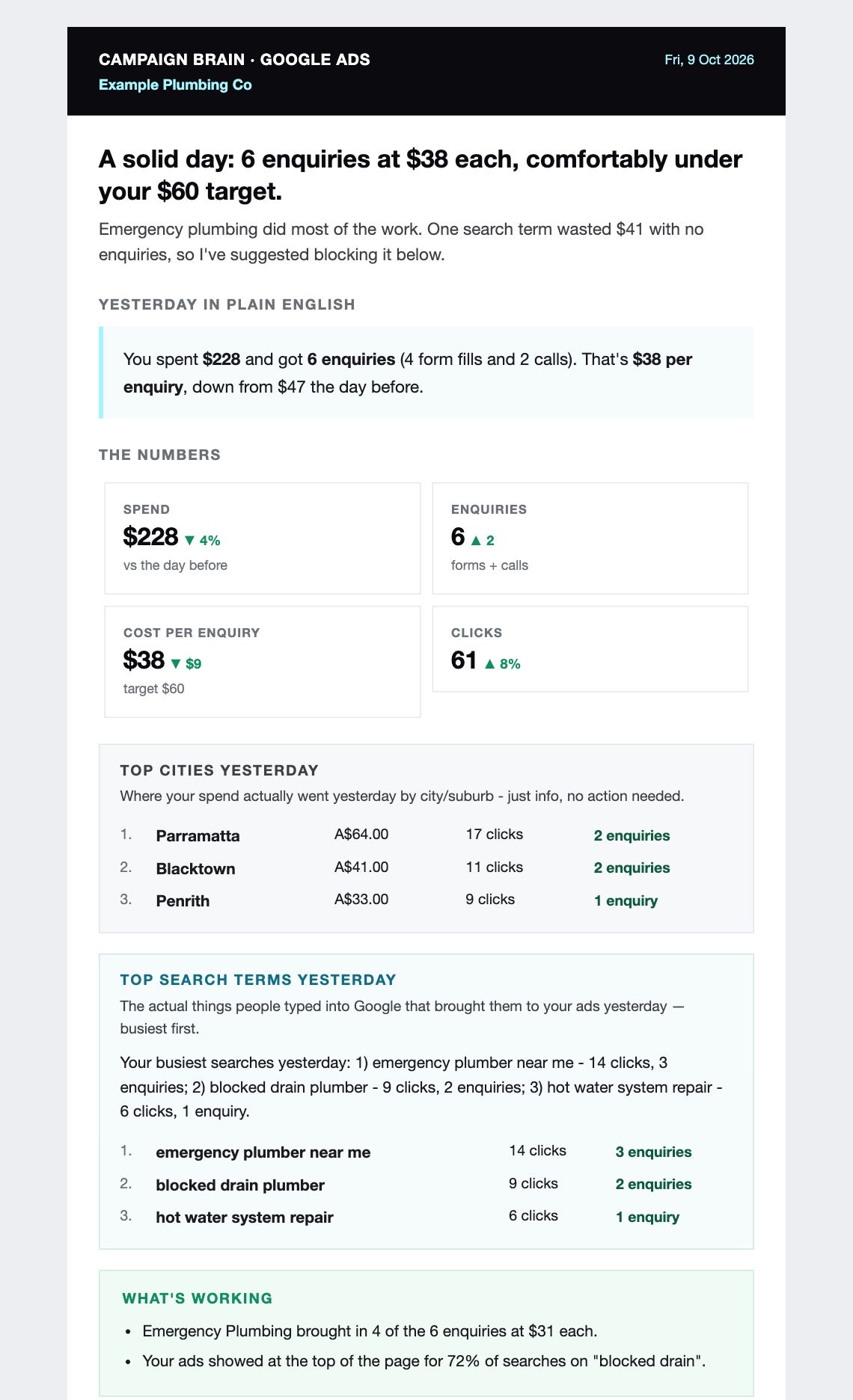
- The headline: one sentence on how yesterday went.
- Yesterday in plain English: what the numbers mean, without the jargon.
- The numbers: spend, enquiries (or sales), cost per enquiry and clicks, compared with the day before.
- Top cities and Top search terms: where your money went and what people actually typed into Google. These are for your information; no action is needed.
- What's working: the bright spots worth knowing about.
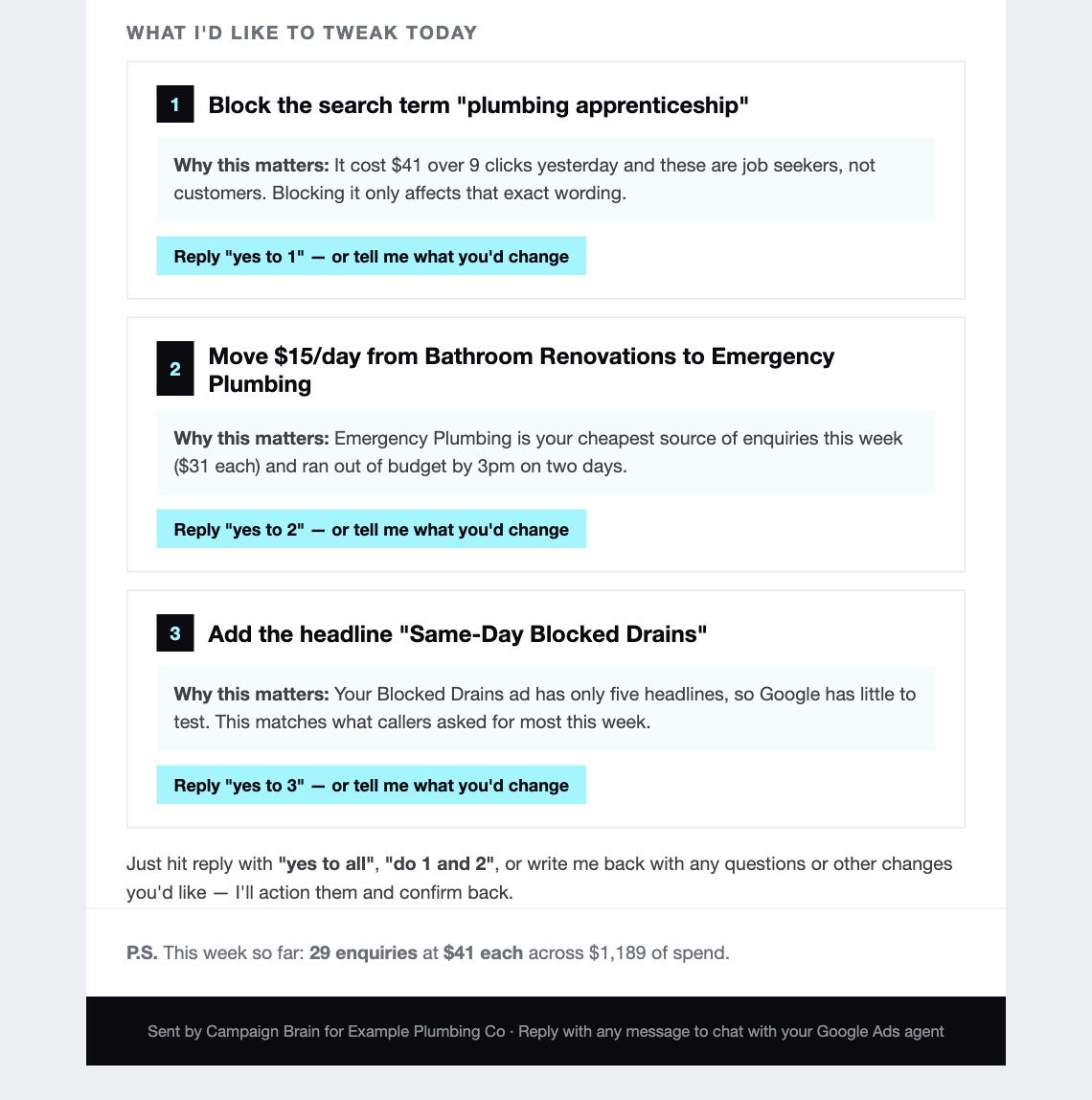
- What I'd like to tweak today: numbered suggestions, each with "why this matters". Reply to approve them. See Approving, declining and changing suggestions.
- P.S.: how the week is tracking so far.
Sections that appear on some days
- Phone calls, if you have call tracking: what callers asked about, and any missed calls.
- Wasted spend blocked: a running total of the search terms your agent has blocked and the money that saved.
- Monday: your top Google rankings for the week, if you have SEO switched on.
- Tuesday: a keyword deep dive. Your most expensive click from last week, plus three cheaper keywords chasing the same customers. Reply yes to A to add one; nothing existing is paused.
- Wednesday: a landing page check, looking at the pages your ads send people to. Advisory only.
- Competitor headlines: when a competitor is running a strong headline, your agent suggests a brand-safe version for your own ads as one of the numbered tweaks.
- New keywords I'm watching: how recently added keywords are performing.
The Facebook & Instagram email
The subject starts with your business name and the main thing the agent wants to do, for example "Example Pilates Studio: refresh your top ad". Inside you'll find:
- Three headline numbers for the last 7 days
- Proof: how earlier changes have played out
- Your top-spending ads and the ad wording with the most money behind it
- What I'd like to do: up to three numbered asks, each with the finished work attached: new designs, video scripts or fresh ad wording. Nothing changes until you reply.
- Free to use today: extras such as new opening lines you can use however you like
On Fridays it opens with a weekly digest of what changed and what it achieved.
The weekly SEO email
If you have Agentic SEO, you'll get "Your Google search traffic, week ending …" each week. It covers your traffic, Google and Maps rankings, whether AI answers mention you, your top searches and pages, and a short list of things to do this week. Reply yes (or yes to 1 and 3) and our SEO team does the work, then emails you when it's done.
The help footer
Every email ends with: "Is your AI Agent not behaving? Just reply with help please and one of our team will get in touch with you as soon as possible." See Getting help from a person.
Still stuck? Reply help please to any Campaign Brain email and our Sydney team will pick it up, or call 1300 304 640. See Getting help from a person.