
Competitor Spy
Competitor Spy shows the businesses appearing against you on Google and the offers they use to win clicks you aren't getting.
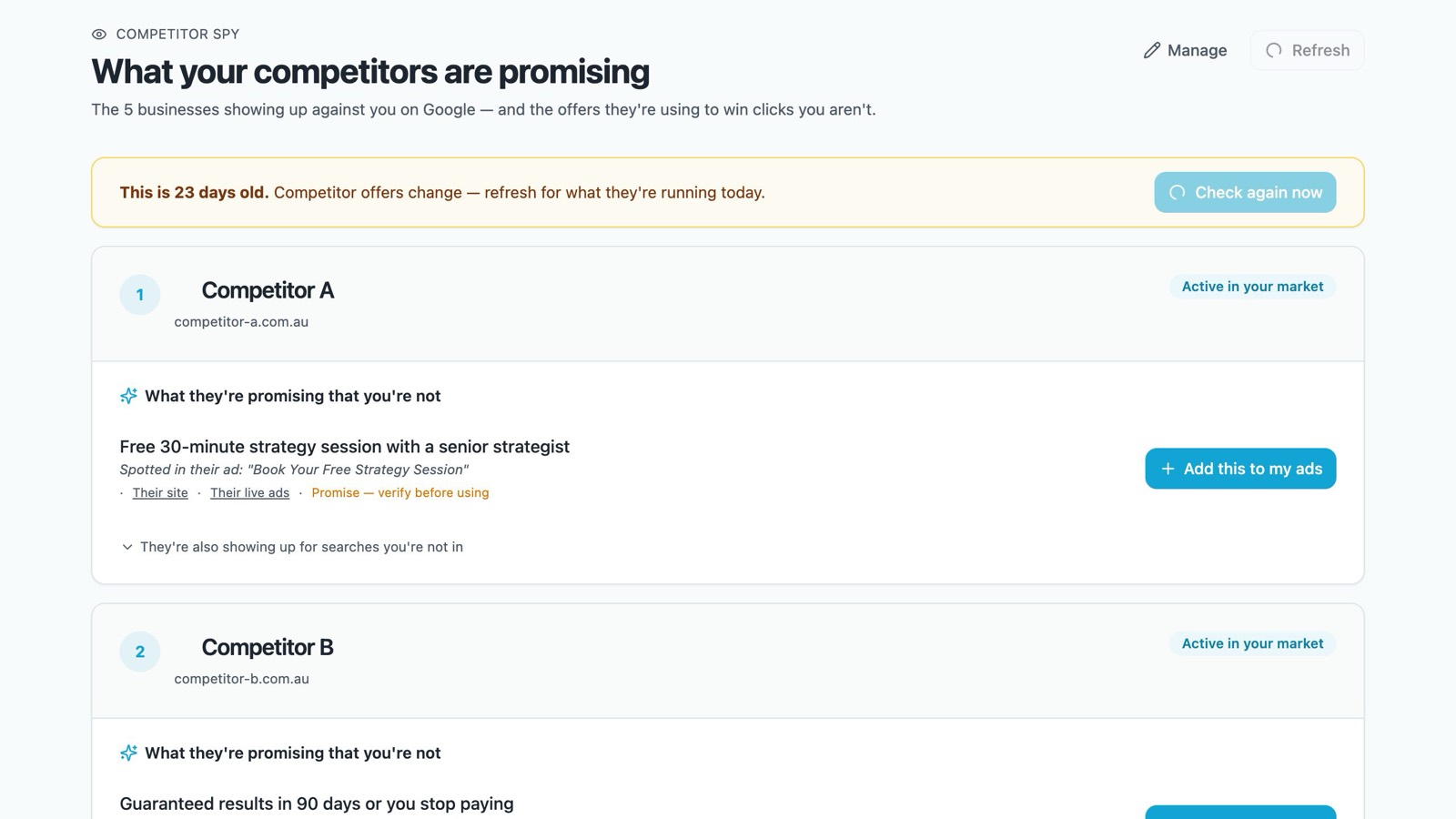
What you'll see
For each competitor:
- What they're promising that you're not: offers, guarantees and claims from their ads, with the exact ad wording and links to their site and live ads
- They're also showing up for searches you're not in: searches they appear for and you don't. Click one to ask Einstein about it.
Claims marked Promise — verify before using are what the competitor says, not something we've checked.
Using an offer in your own ads
If you offer the same thing, click Add this to my ads. For guarantees, prices or credentials you'll be asked to confirm you can actually deliver it first. The request then goes to your approvals. Nothing goes live straight away.
Choosing and refreshing competitors
- Click Manage to choose up to five competitors. You can also set these on the Settings tab.
- Competitor offers change. If the information is more than two weeks old you'll see a notice. Click Check again now or Refresh for what they're running today.
Your daily Google Ads email also keeps an eye on competitors. When one is running a strong headline, your agent suggests a brand-safe version for your own ads as one of the numbered tweaks.
Still stuck? Reply help please to any Campaign Brain email and our Sydney team will pick it up, or call 1300 304 640. See Getting help from a person.